
Download The Fastest Mouse Clicker – mouse clicker, automation tool, clicker software, productivity tool, Windows utility, fast mouse clicks, keyboard shortcut clicker
Overview
The Fastest Mouse Clicker is a specialized utility designed for Windows users seeking to automate repetitive mouse clicking tasks. Developed by Jason A. Bilbrey, this lightweight application targets individuals who need to perform high-frequency clicks efficiently, particularly in gaming environments or time-consuming data entry workflows. The app’s primary purpose is to simulate rapid mouse clicks at customizable speeds, enabling users to automate actions that would otherwise require manual input.
It addresses the common challenge of physical strain and inefficiency associated with prolonged manual clicking, especially in games like Cookie Clicker, where speed and consistency are critical. By allowing users to initiate clicks with either a mouse button or a keyboard shortcut, the software enhances accessibility and user comfort. The inclusion of a click limit feature adds a layer of control, preventing unintended overuse and ensuring precision in automation tasks.
Target users include gamers, digital content creators, and professionals engaged in repetitive digital tasks. The app fits into the broader productivity tool ecosystem by reducing human error and increasing output consistency. Although the developer did not provide additional technical details about the app’s architecture or integration with other systems, its minimal file size of 1.2 MB suggests a streamlined design focused on core functionality. The app’s release date of October 15, 2023, indicates it is a recent entry in the automation space, potentially reflecting updated compatibility with modern Windows environments.
Key Features & Functionality
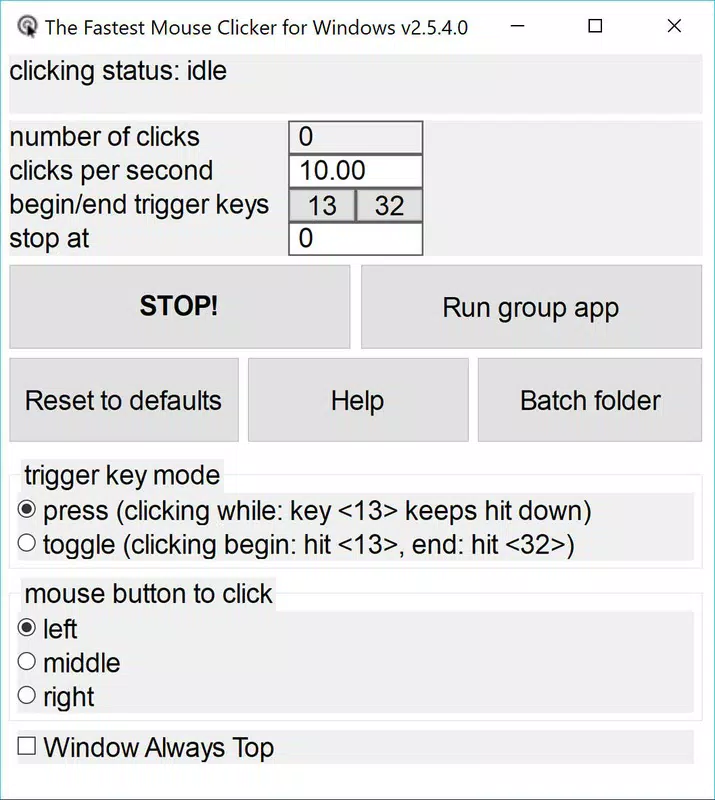
- High-speed click automation: The app enables users to generate thousands of mouse clicks per second, ideal for rapid-response applications such as clicker games or automated testing scenarios.
- Flexible activation method: Users can trigger the clicker using any mouse button or a designated keyboard key, allowing for personalized setup based on comfort and workflow.
- Click limit configuration: The software supports setting a maximum number of clicks, such as stopping after one million clicks, to prevent overuse and maintain control over automation processes.
- Universal compatibility with input devices: Works with standard mouse and keyboard hardware, making it accessible to a wide range of users without requiring specialized peripherals.
- Minimal system resource usage: With a file size of just 1.2 MB, the app is designed to operate efficiently without consuming significant memory or processing power.
For example, a gamer playing Cookie Clicker can set the clicker to activate with a single key press and configure it to stop after a set number of clicks, eliminating the need for continuous manual input. Similarly, a data entry operator could use the tool to automate repetitive form submissions, reducing fatigue and improving workflow consistency. The ability to customize activation and stop conditions makes the app adaptable across various use cases, from casual gaming to professional automation.
Interface, UX & Performance
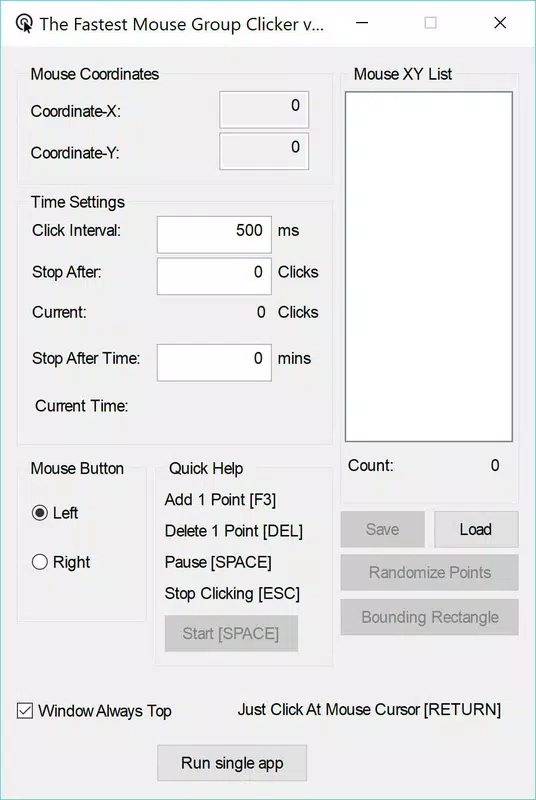
The Fastest Mouse Clicker features a minimalistic interface focused on essential controls, prioritizing usability over visual complexity. The layout is straightforward, with clearly labeled options for activating the clicker, setting the click speed, and defining the click limit. Navigation is intuitive, allowing users to configure settings with minimal steps, which supports quick onboarding for both novice and experienced users.
Although the developer did not list formal performance metrics, the app’s small file size and dedicated functionality suggest optimized operation. It is expected to run smoothly on standard Windows systems, including entry-level and mid-range devices. Responsiveness appears to be a key design goal, as the tool is intended for real-time automation without lag or delay. Stability is implied through the inclusion of a click limit feature, which helps prevent system overload during extended use.
Users can expect consistent behavior across different device categories, though specific compatibility details were not disclosed. The app does not appear to rely on external dependencies, reducing the risk of crashes or conflicts. Overall, the user experience emphasizes simplicity and reliability, aligning with the needs of users seeking a no-frills automation solution.
Platform Compatibility & Technical Requirements
The Fastest Mouse Clicker is designed exclusively for the Windows operating system. It is compatible with Windows platforms as of its release on October 15, 2023. The application has a file size of 1.2 MB, indicating a lightweight footprint that minimizes storage impact and enables quick installation.
Specific requirements such as minimum OS version, processor architecture, or RAM specifications were not listed by the developer. As such, compatibility with older or newer Windows versions cannot be confirmed. The developer did not specify whether the app supports Windows 10, Windows 11, or legacy systems like Windows 7 or 8. Similarly, no information was provided about 32-bit vs. 64-bit support or hardware acceleration capabilities.
Given the app’s small size and focus on basic automation, it is likely to function on most modern Windows machines. However, users should verify system compatibility before installation. The absence of detailed technical disclosures limits the ability to assess performance across diverse hardware configurations.
Pros and Cons
Pros
- Lightweight design with a 1.2 MB file size
- Free to download and use
- Supports customizable click limits for safe automation
- Flexible activation via mouse button or keyboard shortcut
- Simple interface suitable for users of all experience levels
Cons
- Platform limited to Windows; no support for macOS or Linux
- Developer did not provide detailed system requirements
- No visible update history or changelog available
- Functionality restricted to mouse click automation only
- Compatibility with older Windows versions not confirmed
FAQ
Is The Fastest Mouse Clicker safe to download and install?
The app is free and available for download from its official source. As with any third-party utility, users should ensure they are downloading from a trusted location to avoid malware or bundled software.
Can I use this tool on macOS or Linux?
Currently, the app is only available for Windows. There is no official version for macOS or Linux platforms.
Does the app require an internet connection?
Based on its functionality, the app does not require an active internet connection to operate. It functions entirely offline once installed.
How do I stop the automatic clicks?
The clicks can be stopped manually or automatically when the configured click limit is reached. Users can also use the activation key or button again to halt the process.
Are there regular updates for this app?
The developer has not provided information about update frequency or release history. Users should monitor the official source for any future updates.
Final Thoughts
The Fastest Mouse Clicker delivers a focused, no-nonsense solution for users needing rapid, automated mouse clicks on Windows. Its minimal design, free access, and configurable safety features make it a practical choice for gamers and professionals alike. While it lacks broad platform support and detailed technical documentation, its core functionality is reliable and well-suited for its intended use cases.
For anyone facing repetitive clicking tasks—whether in gaming, data entry, or automation workflows—this tool offers a straightforward way to save time and reduce strain. Its simplicity and efficiency stand out in a crowded market of productivity utilities.
Download The Fastest Mouse Clicker now


